Clients rarely quit all at once. For weeks, everything looks fine: the workouts get logged, the check-ins come in, the boxes get ticked. Underneath, they're drifting. Sleep slides, the same sessions feel harder, protein slips, the check-in answers get shorter and the questions stop. Then one month the renewal doesn't happen. Most at-risk coaching clients give plenty of warning. It just builds slowly, across several numbers, while every individual box still looks ticked.
That's the gap Signals were built to close.
Signs a client is about to quit, and why you see them late
Ask any experienced coach and you'll hear the same early warning signs of disengagement: logging gets patchy, check-ins get shorter, effort ratings creep up for the same work, sleep and stress get worse, protein drifts down, replies get slower, and the client stops asking you anything.
None of those is alarming on its own, and none of them shows up on a checklist. A client who logs every workout and answers every check-in looks engaged, even while their recovery, mood and nutrition have been sliding for a month. The warning is in the trend and the combination, compared to what's normal for that person. That's very hard to see week to week when the numbers live in different places and you have 20 other clients. It's not a coaching skill problem. It's an attention problem, and attention runs out.
What Signals are
Signals are how MetabolicHQ keeps watching when you can't. Every morning, the app checks each client's check-ins, training log and effort ratings, food diary and biometrics, and says when something needs attention, or when something is working.
A few rules make them worth trusting:
- Each client is compared to their own normal, their last 30 days, not to a chart or another client.
- One reading never triggers a signal. A change has to hold for several days, and there has to be enough data to judge it.
- No repeats. Each signal has a cooldown, so it doesn't nag.
- No AI reads client data. Signals are plain, fixed rules, and they're not medical advice.
- Safety can't wait for morning. Safety signals are checked hourly and right after a client saves a glucose, ketone or resting heart rate reading.
What Signals catch
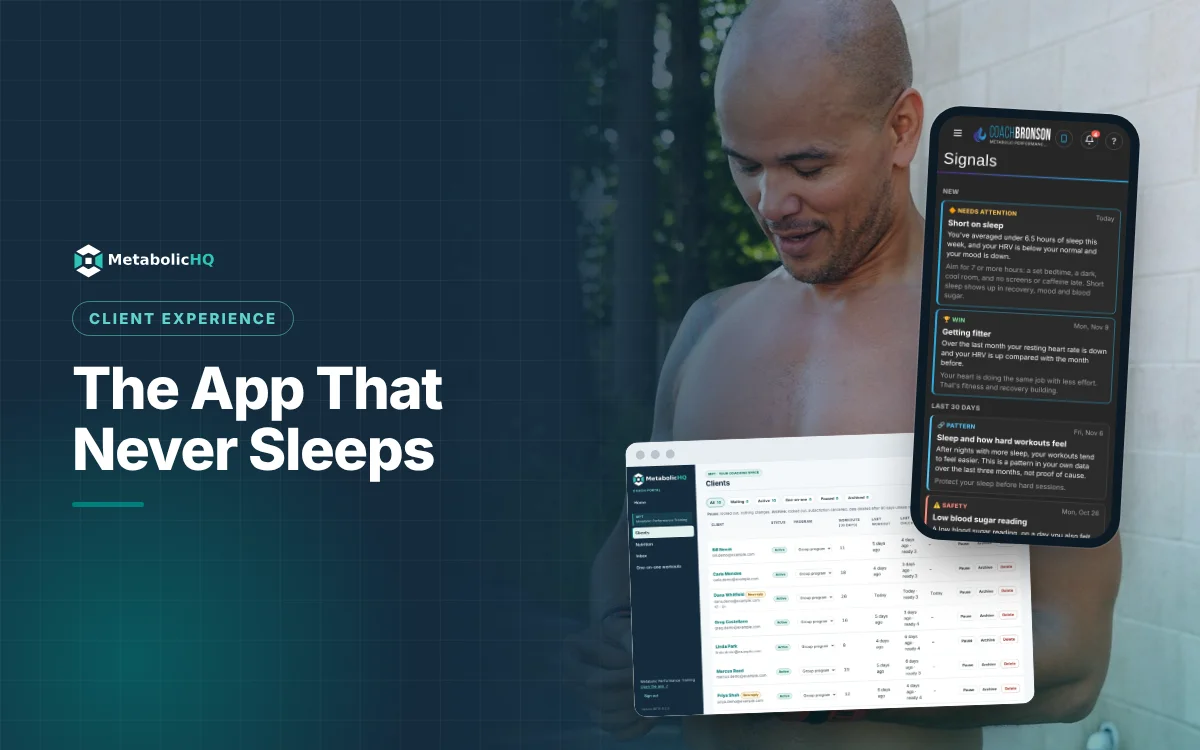
- Safety: things like very low blood sugar, very high ketones alongside high blood sugar, or a resting heart rate far above normal. The client gets fixed advice, and you get a push notification and an email straight away.
- Needs attention: not recovering well, possible early illness, workouts feeling harder, not eating enough protein, losing lean mass, not reaching ketosis, short on sleep, stress taking a toll. Each comes with a suggestion.
- Coach watch: a client pulling away. Only coaches see this one.
- Wins: getting fitter, body recomposition, keto-adapted, better blood sugar control, consistency streaks and more. Good news deserves a notification too.
- Patterns: links in a client's own data over three months, like sleep and workout effort, or carbs and next-morning blood sugar, worded as a link, never as a cause.
How Signals help you coach at-risk clients
Your coach Home opens on what needs you today: safety signals first, then needs-attention signals, alongside new messages and clients who've gone quiet for a week. Wins from the last two weeks sit there too, so you can say "I saw that" while it still matters. Each client's profile in the portal has a Signals tab, and Inbox lists every client's signals in one place.
You stay in charge. You can switch off any signal for a particular client, or move its lines, like the low-glucose threshold or the hours that count as short sleep, to fit the person you're coaching.
Clients see their own signals on Home with a plain-language suggestion, so the conversation is already started when you reach out. "I noticed your recovery's been down since Thursday" lands very differently from "Haven't heard from you in a while." It's the same reason visible progress keeps clients coming back: people stay when someone is paying attention.
Always getting better
Signals launched as one feature and have kept improving since, much of it from watching how coaches and clients actually use them. Coaches got a Home dashboard that puts safety and needs-attention signals first. Clients can clear signals from Home, and old ones age out so the screen stays useful. Inbox search finds a signal fast. On teams, each coach sees only the clients they coach. And when a client sends a pain alert, it now arrives as a safety signal.
More is on the way. AI client analytics across training, nutrition, biometrics and biofeedback is in development, and wearable sync will give Signals more to work with than manual entry can. If there's a pattern you watch for in your own clients, send it as a suggestion from the app. You'll get a real answer, and the best ideas become the next signals.
You still make the call
Signals don't coach. They make sure you never find out last. Everything they surface still goes through your judgment, which is the whole point of technology that notices instead of just storing. Signals are included on every plan, including free for up to 5 clients.
Coach BronsonFounder of MetabolicHQ. 20 years coaching human performance and nutrition, 25 in IT engineering and program management. More about me
Try it with your own clients
MetabolicHQ is free for up to 5 clients: training, low-carb nutrition, biometrics and coaching calls in one app under your brand.
Start free